Virtual Scans (3D View)
|
1238888 |
For technical reasons, handheld scans cannot be displayed as a Panorama View in WebShare. They must be converted to so-called virtual scans first and can then be uploaded.
Virtual scans are created from the point cloud data of already existing scans. After the virtual scans were created, they behave like scans which were recorded with a laser scanner.
You can open a virtual scan in
- quick view,
- planar view, and
- 3D view.
You can export a virtual scan as
- an image,
- as an object,
- as scan points, and
- as a new scan project.
-
Click the Create Virtual Scan button
 in the toolbar. The Create Virtual Scan dialog is shown: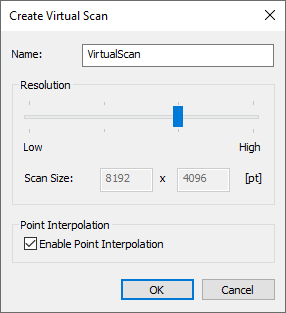
Figure 10-58 Create virtual scan dialog
Name
Enter a name for the virtual scan.
Resolution
Set the resolution with the slider. The first number corresponds to the number of columns, the second number for the number of rows.
Point interpolation
Select, if the virtual scan shall include interpolated points.
-
Click the OK button to start the creation of the virtual scans. A folder named VirtualScans will be created which contains the virtual scans.
Export the virtual scans
After you are done with creating all the virtual scans, you can continue with the usual Export to WebShare functions.