Import Reference Points
|
1238888 |
Usually, external reference points are measured with survey equipment such as a total station. For spheres, the survey point lies the center point of the sphere. For circular flat targets, the survey point lies the middle of the light circle, which stands out clearly from the surrounding darker border. Finally, for checkerboards, the survey point lies the center point of the four quadrants.
Survey data can be imported, for example, from a .csv file into SCENE. You can import the survey data into a specific folder or cluster. Survey data is displayed in a References folder in the structure view.
In the selected location, a folder called References contains a separate object for each survey point with the name and coordinates from the survey file.
External references are used for target-based registration.
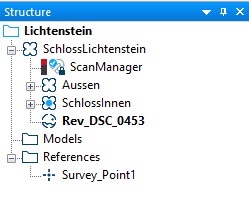
Figure 7-17 External References Folder
When registering scans within a cluster, external references are not mandatory. Nevertheless, existent external references will be used and will have a higher weighting in the registration algorithm than scan references.
When importing survey data, SCENE uses a right-handed coordinate system.
In some applications, scans shall be registered without referring to higher-leveled references. In this case, create an empty Reference folder on the same level as the cluster with these scans, or create it somewhere between the cluster and the Reference folder which would be used.
Each row of the file contains one single reference point with the following specifications: name, x coordinate, y coordinate, z coordinate, and measurement quality. All four specifications must be given and must be separated by the same separator, which can be a blank space, a colon, a semicolon, or a tab. The coordinates are specified in the unit that has been defined in Settings > General.
SCENE uses a right-handed coordinate system.
-
Click the Import Surveyed Points button
 in the Import toolbar.
The file system browser will open. -
Select the file format Surveyed points (*.cor, *.csv).
-
Browse to select the files which you want to import.
-
Click the Open button.
The file will be imported.