FARO Laser Line Probe Settings
|
1238888 |
Modify the settings of the
-
Scan Rate - the number of lines per second that the LLP records and sends to your current file. Fewer lines per second requires you to move the LLP slower.
-
Scan Density - the amount of points each line contains. More points in each line creates a larger file. If you are digitizing a relatively flat surface, use less points.
-
Material - controls the camera which records the laser line. Different part material colors and textures reflect the laser line differently.
-
Advanced Settings - controls the exposure settings of the camera.
To change the
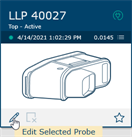
Probes dialog box
-
Choose the Laser Probe probe in the Probes dialog box.
-
Click Edit.
The settings dialog box differs depending on the current LLP.
In the Edit Probe dialog box, you will see all of the information about the FARO
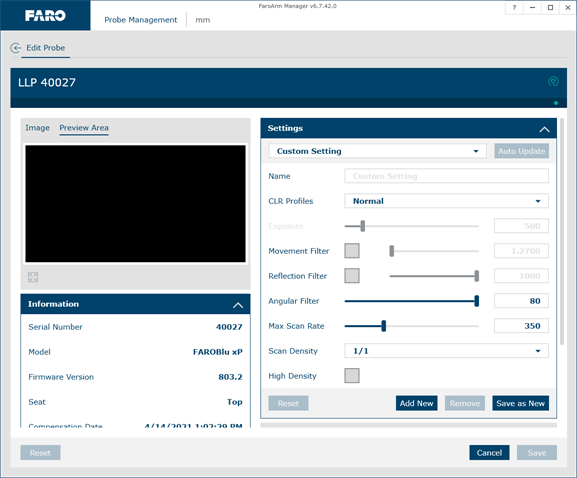
Modify Probe dialog box - LLP
When the LLP is within the operating range, you will see the line in the Preview Area of the dialog box.
Information
The Information section displays the unique information for the current LLP.
Settings
Use the Scan Rate Density settings for data reduction. Reducing the number of points the LLP collects can improve system performance, increase scanning speed and potentially reduce unwanted noisy data.
-
From the Material drop-down window choose any existing material setting. Use the commands in this drop-down window to save material settings.
The current material setting is stored on your computer and in the
-
Click the Auto Update button to set the Noise Threshold, Exposure, and Laser Intensity levels for the current material. Hold the LLP in position, pointing at the surface, until the process completes. You can also set the values manually:
-
Algorithms - Select an exposure setting:
-
Fixed: The Exposure setting is constant and does not automatically adjust during use.
-
Normal: This is an automatic mode to scan non-reflective, or dull, materials. The Exposure level is set to a low level and as you digitize, the Laser Intensity setting automatically adjusts to maintain the proper saturation level.
FARO recommends this algorithm for the compensation of the FARO
-
HDR: This is an automatic mode to scan high-contrast surfaces such as a black and a white surface. This algorithm uses a dual exposure where the first exposure is looking for high return surfaces such as white and the second exposure is looking for low return surfaces such as black.
Using this algorithm may result in a reduced rate of data capture.
The Automatic algorithms disable the Auto Update button and the Exposure slider.
-
-
Choosing any of the Automatic settings adds an exposure indicator to the Range Finder dialog box. In the Range Finder dialog box:
-
A green dot in the upper left-hand corner of the Range Finder dialog box indicates that the exposure has been adjusted and you are ready to scan.
-
The indicator changes to either a red “+” (plus) or “-” (minus) sign indicating that the LLP is either over-exposed or under-exposed, and it is automatically adjusting the exposure. The LLP does not collect data during this adjustment, however this automatic adjustment process is very fast.
-
-
Exposure - How long the “shutter” is open and the sensor is exposed to light in the camera. Move the slider, or enter a number; the corresponding value in milliseconds appears next to it. Light colors and reflective surfaces are better captured with low exposure levels. Darker colors typically require higher exposure levels.
-
Movement Filter - A filter to prevent the capture same line of data. The value is the distance the line must move before capturing another line of data. Clear the check box to disable this filter
-
Reflection Filter - This is a filter to remove unwanted points when scanning reflective surfaces. Select the check box and control the amount of filtering by moving the slider:
-
Minimum amount - move the slider all the way to the left.
-
Maximum amount - move the slider all the way to the right.
Points affected by the Reflection Filter will be colored blue in the Preview window.
The Automatic algorithms disable the Auto Update button and the Exposure slider.
-
-
Angular Filter - This is a filter to remove points by analyzing the point’s angle of incidence to the camera. The lower the number, the more normal the points will have to be to the LLP. Reduce the filter if you have problems with high reflective surfaces and are collecting reflections.
-
Max Scan Rate (LLP HD only) - Set the maximum scan rate (scans per second) of the LLP.
-
Scan Rate (LLP Prizm only) - Choose the number of scan lines per second. 1/1 is the normal rate of scan lines per second, set this to discard scan lines.
-
Scan Density - Choose the number of points on each scan line. 1/1 is all of the points on the laser line, set this to discard points on each line.
-
High Density - Select this check box to double the amount of points on each laser line.
If you experience gaps in data collection and/or slow processing speeds during scanning, lower the Max Scan Rate until the data collection and processing is constant.
-
Click Save as New to save a material setting.
-
Click Add New to create a new material setting.
-
Click Remove to delete a material setting.
-
Click Reset to return all the values to the factory default.
In general, the default values for all settings described here will yield acceptable data on most surfaces. The Exposure parameter requires more frequent adjustments based on the different surface finishes you are scanning.
Keep in mind that given the vast range of colors, textures and finishes, there is no exact science for these LLP Settings that work best on a particular surface. Finding the optimum settings may require some practice.
Options
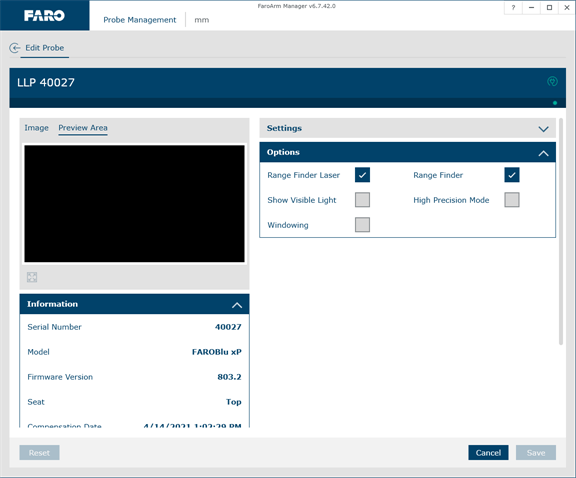
Options - Edit Probe dialog box
-
Disable the Range Finder Laser box by clearing the Range Finder Laser On/Off check box. For more information, see Range Finder .
-
Disable the Range Finder dialog box by clearing the Range Finder check box. For more information, see Range Finder Dialog Box.
-
Select the Show Visible Light check box to add all visible light to the Preview Area window.
Adding all visible light to the preview window will decrease the number of frames per second sent to the computer and should only be used when diagnosing problems with the LLP.
-
Select the High Precision Mode check box to operate the LLP in the High Precision mode. High Precision mode improves the resolution of the LLP. However, it reduces your field of view by one half and shortens your effective maximum scan line width to two thirds of the normal width, optimizing the resolution of the LLP.
Always clear this check box when compensating the FARO
-
Select the Windowing check box and adjust the window over the Preview Area to capture points only in a part of the laser line, or only in the near or far field range of the LLP. In the Preview Area:
-
Top - the Far field
-
Bottom - the Near field
-
Left - the left side of the laser line
-
Right - the right side of the laser line
Drag window’s four corners to adjust the capture area. Changing the area of interest in the near and far field will increase the LLP HD scan rate.
-
Using the Windowing feature automatically disables the High Density feature.
Saving and Managing LLP Settings
-
Click Reset to return all the LLP values to the factory default.
-
Click Cancel to discard any changes.
-
Click Save to save the current LLP settings. These change remain until changed or reset.
Additional Considerations
-
First, if accuracy is not an issue, even failing probe compensation will not prevent you from using the LLP to show the concept of gathering point clouds quickly and easily, directly into software applications. The
-
Second, if the probe compensation does fail, you should look at the probe compensation log to see by how much. If the error is acceptable, you should be able to scan effectively for medium accuracy applications.

