Common Features in the Dashboard Tables
|
1238888 |
The following features are available in the Dashboard tables, mostly in the list view. Note however that not all features are available in all tables.
Search and Sort
Sorting and searching is available in both, the list view and the tile view.
 Search
You can enter any string in this field. The content of the data content view will automatically adapt while you are typing.

 Sort Ascending and Descending
Click one of these icons to sort in an ascending or descending manner. This feature is also available in the tile view.
To select a search criterion:
-
Click the text to the right of the icon.
A dropdown list with table specific search criteria will be displayed. -
Select the search criterion you want.
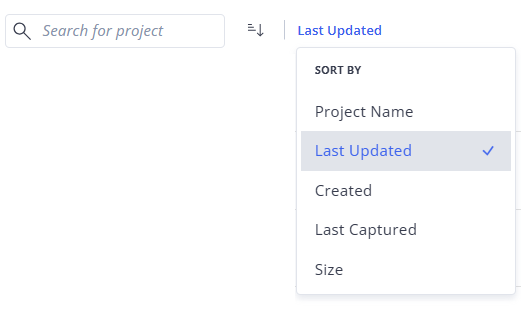
Figure 1-12 Search by - example

 Sort by Table Header
You can also sort according to the column you want.
If you click a column header a sort icon is displayed. Click this icon to sort in an ascending or descending way.
Customize Tables
You can change the order of columns as well as add and hide columns. This customization is persistent and will be available if you open Sphere XG the next time.
Move Columns to another Position
-
Hover the mouse pointer over a column.
The icon will be displayed and the mouse pointer is displayed as hand.
 -
Click and hold, then drag the column to the position you want.
Note that this is not possible for the first column.
Add or Hide Columns
-
Click the
 icon on the right side of the column header.
A dropdown with available columns is displayed. Columns that are already shown in the table have a blue checkmark. -
Click the columns you want to show or hide.
-
Close the dropdown by clicking outside it or click the x icon.
Select Elements
Clicking the  icon at the top of the table selects all entries.
If you hover the mouse pointer over a table row, the icon will be displayed. Clicking the icon selects the element in this table row. For example, you can select a subset of elements for an export.
Export
You can export projects, members and groups in .csv, .xlsx and .json format. See also Export Projects, Members and Groups.
Three-dots Menu
Hovering over a table row will display a three-dots menu at the right side. Depending on the currently active table, the entries differ.