Group: Active and Archived Projects Tabs
|
1238888 |
These two tabs show lists of the projects which belong to the selected group with their roles and access levels. The Active projects tab shows all active projects of the group, while the Archived projects tab shows all archived projects of the group. For more information on active and archived projects, see Archive and Unarchive One or More Projects.
Click Groups in the task panel, then Active projects or Archived projects.
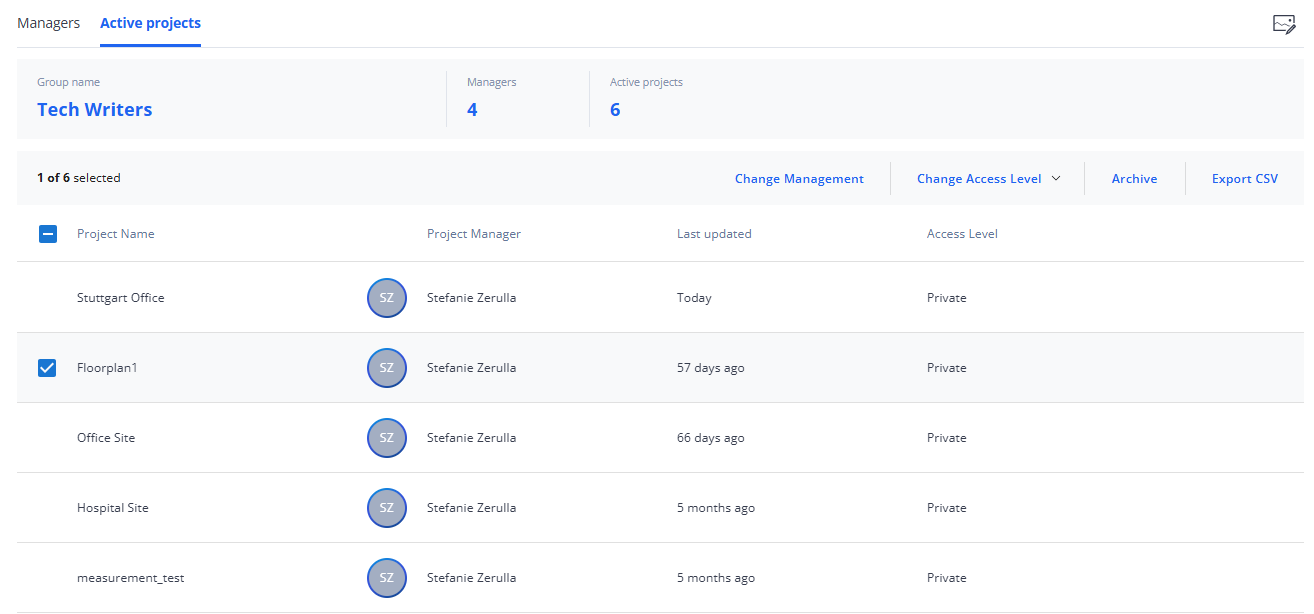
Figure 1-30 Groups, Projects tab
 Change Thumbnail: By default, a standard image is used for a new project. Clicking the preview image opens the Change Thumbnail form. You can select a standard image from the Gallery tab or add an image from your computer by dragging it onto the form or selecting it from the file system. Note that the file size must not exceed 10MB.
 Edit: If there is editable content, the edit icon is displayed when you hover the mouse pointer over an entry.
Projects Summary
This is the same as the Members Summary in Group: Members Tab.
Projects List
This list contains the projects that belong to the selected group. The content is similar to the Active and Archived tabs on the Project page. Note however, that you cannot create new projects in this view.