Basic Concepts
|
1238888 |
The following basic concepts are important for understanding SCENE.
Scans
Scans are the scan files as they are recorded by the scanner with their millions of data records that include position, reflectance, and color for single scan points. Scans consist of scan points that were recorded from a single scanner location. They are organized in a row column order.
Scan Point Clouds
Scan point clouds are an alternative representation of the scans and must be created from the single scans. Scan point clouds are organized in a spatial data structure that facilitates fast visualization of scan points and automated point loading based on point visibility. They may facilitate and accelerate the processing of the scan points.
Project Point Cloud
The result of a scan project in SCENE typically is a comprehensive project point cloud of the scanned object.
Unlike scans and scan point clouds, the project point cloud consists of the points of all the scans within your scan project and can be seen as a comprehensive point cloud of the complete scan project. This means that a project point cloud can be very large. It is typically created from all the single scans in your project after they have been processed, colorized and registered.
The project point cloud is optimized for fast visualization of large amounts of scan points in the 3D view and is organized in a spatial data structure that facilitates fast visualization of the scan points. However, such large amounts of points cannot be loaded into a physical memory at once. Therefore, the points of the project point cloud are automatically loaded and visualized on demand based on the camera position and point visibility. The automated point loading of the project point cloud can visualize hundreds of scans at once. This empowers you to actually see all scans of a scan project at once regardless of whether they fit into your computer’s physical memory. Manual scan file loading is not necessary.
As the point cloud visualization technique is constantly loading scan points from the hard disk drive based on point visibility, the overall performance strongly depends on the speed of your hard disk drive. While project point clouds outperform all other visualization methods (including scan point clouds) on regular hard disk drives, we recommend using a solid state drive for maximum performance. Using a solid state drive will also speed up the process of creating the project point cloud.
Structure View
In the structure view, you can see the hierarchy of the objects.
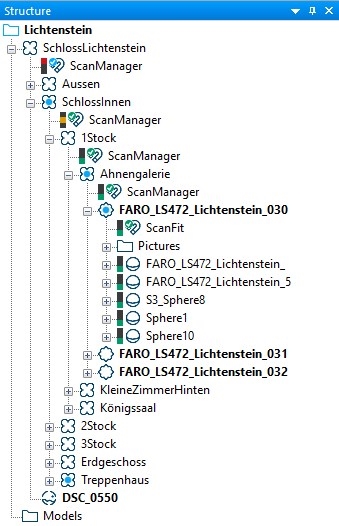
There are various views to display and explore scans and scan point clouds:
-
Quick View: The standard scan view to examine single scans. For this, the scan doesn't have to be loaded. The quick view is available within a few seconds. In the meantime, the scan data will be loaded in the background. You can manipulate the scan points as soon as background loading is finished. Until then you are only able to view and navigate. You can find further information in topic Quick View.
-
Planar View: Used to examine single scans. The scan must be loaded. At first glance, the planar view may appear very strange because the scanned area seems to be distorted. Connections between objects in the picture do not run in a straight line but are curved.
-
3D View: With the 3D view, you can achieve the most easily comprehensible view of the scan points and CAD models. The 3D view is normally set up with the field of view corrected, so that you get an impression close to reality. Unlike the quick view and the planar view, scan points manipulation and analysis is limited in the 3D view. You can find further information in topic 3D view.
-
Overview Map: The overview map provides a top view overview to the whole scan project. The map is by default, a gray scale image. It is recommended to create the map after the registration and cleanup of scan points is completed. (Note that the map is created from the points in the individual scans—not from the project point cloud.) You can find further information in topic Overview Map.
WebShare Data
WebShare and Sphere Legacy are not further developed. It is recommended to use Sphere XG instead.